


Starterkit: Line-Drawing
Line-Drawing Game Starterkit
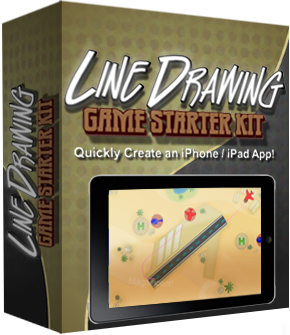
Site License! Unlimited Apps!Royalty Free! No Attribution!60 day money-back guarantee!Made with the popular cocos2d-iphone game engine.Compatible with cocos2d-iphone v1.1 and v2.0, Xcode 4.6 and iOS 6.Includes ARC enabled versions of the starterkit! |
All Starterkit project artwork provided by Arezou Ipakchi Design. Promotional images created by Justin from CartoonSmart.
What it is:
Get a head-start for your Line-Drawing game and save days if not weeks of your time! You’ll get gameplay code modelled after the extremely popular Flight Control game. You’ll learn how to draw lines, detect touches on objects, have objects follow a path - and much, much more! Written by a professional game developer and game industry veteran (me) the source code is annotated with lots of comments explaining my rationale and written with readability in mind.

Contains separate iPhone & iPad targets!
The Starterkit includes targets for iPhone and iPad using the same code if you don’t want to create a Universal app, for example to reduce your app’s size or to be able to charge more for the iPad version. If the iPad Target is selected hi-res iPad images will be used. Image selection is done automatically by loading those images whose filenames have the “-ipad” suffix, the same suffix cocos2d uses.
What others are saying:
“Code is quite clearly written and decently documented […] definitely a fine investment.”
From: Commercial cocos2d Code review from Alex Curylo.
“It was an awesome moment when I found the source for a line draw game of this caliber.”
-Franklin Lyons, SpinFall
“Especially the path and movement system is saving me lots of headaches.”
-Martin Hoffmann
Games made with this Starterkit:
Launch Control
 |
 |
 |
Ferries HD
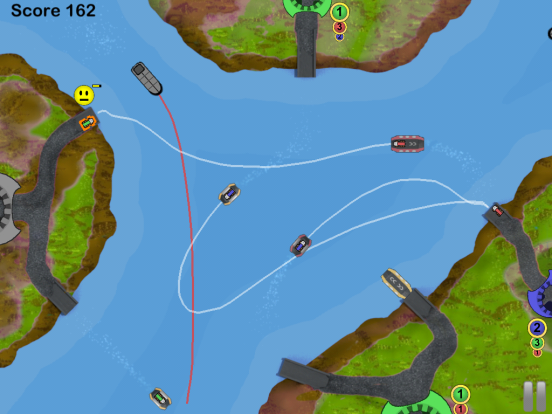
Feature List:
- cleanly seperated and well-structured GameScene code design with a minimum of dependencies
- easy to add new objects and extend object parameters
- touch object & draw a path for it (whether it’s already following a path or not)
- path drawing ends when path is drawn over appropriate target location (eg airstrip for airplanes, respecting angle of approach)
- path drawing ends when arbitrary point limit is exceeded (to avoid slowdowns)
- path is drawn when dragged with thick transparent line style like Harbor Master, without glitches
- path is split into equal length pieces no matter how quickly user moves finger
- objects spawn outside screen, locations can be re-defined and extended
- objects display incoming warning marker at screen border
- objects display collision warning when any two of them are getting too close
- objects follow path to end - then fade out and increase score or continue moving
- objects always rotate in movement direction
- objects bounce back at screen borders
- motivational Labels for successful landings, precached
- Score and HighScore Labels
- HighScore saved to disk between play sessions
- supports both Landscape orientations with autorotation
- loads correct resource files depending on Target (iPhone or iPad)
- proper Pause handling for incoming calls, SMS
- many generally useful Math Helper functions included
- lots of comments explaining rationale and giving tips for improvement
- assertive coding style to help catch coding errors early on
- offline and online documentation
- you can choose between using cocos2d-iphone v1.1 and v2.0
- you can choose between using ARC or classic manual reference counting
- compatible with iOS 5.0 and newer, including iOS 6
- compatible with Xcode 4.6 (the most recent versions also work)
- easy setup: just unzip, open Xcode project, select build scheme, build and run
Questions? Need Help?
Just send me an email.
Legal Disclaimer
Cocos2D is a registered trademark of Ricardo Quesada. Steffen Itterheim, the Learn & Master Cocos2D website and the Line-Drawing Game Starterkit are neither affiliated with nor endorsed by Zynga or Ricardo Quesada.
Try Before Buy!
|
Demo App for iPhone
|
|

Buy Now!
Site License! Unlimited Apps!Royalty Free! No Attribution!60 day money-back guarantee!Made with the popular cocos2d-iphone game engine.Compatible with cocos2d-iphone v1.1 and v2.0, Xcode 4.6 and iOS 6.Includes ARC enabled versions of the starterkit! |
License Agreement
Copyright
Purchase grants you the License to use and modify the source code and assets under the following Terms and Conditions:
You are not allowed to make the source code publicly available. You are not allowed to give or sell the source code to others, modified or not. Licenses are not transferable.
All Licenses are royalty free. You can make as many free or commercial Apps using the source code as you want. You may re-use any existing assets in your App.
If you do contract work and have or want to give the Starterkit source code to your client, your client needs to purchase a Site License as well.
Site License
Each purchase grants you a Site License. The Site license grants you the use of the Starterkit without restrictions at one site.
A site is an office, building or living space rented or owned by the company or individual making the purchase. It allows anyone working on site to use and modify the Starterkit source code.
Large companies operating at several sites need to purchase a site license for each individual location if the Starterkit is to be used at multiple locations. Contact me if you’re such a corporation and you prefer a flat fee license with your own license text to go along with it.
Support
Updates to the Starterkit are done on an as needed basis. I will also keep it up to date and running with the latest stable releases of cocos2d. Updates are distributed via a download link sent to the email address you used for your order. If your email address ever changes please contact me, ideally you should forward me your order confirmation in that case to speed up the change.
Source Code not covered by this License
The licensed Source Code project contains files which are available for free and are governed by different licenses. The Terms & Conditions outlined here do not apply to source code files which do not contain the Copyright notice “Copyright (year) Steffen Itterheim. All rights reserved.”.
Disclaimer
THIS SOFTWARE IS PROVIDED “AS IS” AND ANY EXPRESSED OR IMPLIED WARRANTIES, INCLUDING, BUT NOT LIMITED TO, THE IMPLIED WARRANTIES OF MERCHANTABILITY AND FITNESS FOR A PARTICULAR PURPOSE ARE DISCLAIMED. IN NO EVENT SHALL THE REGENTS OR CONTRIBUTORS BE LIABLE FOR ANY DIRECT, INDIRECT, INCIDENTAL, SPECIAL, EXEMPLARY, OR CONSEQUENTIAL DAMAGES (INCLUDING, BUT NOT LIMITED TO, PROCUREMENT OF SUBSTITUTE GOODS OR SERVICES; LOSS OF USE, DATA, OR PROFITS; OR BUSINESS INTERRUPTION) HOWEVER CAUSED AND ON ANY THEORY OF LIABILITY, WHETHER IN CONTRACT, STRICT LIABILITY, OR TORT (INCLUDING NEGLIGENCE OR OTHERWISE) ARISING IN ANY WAY OUT OF THE USE OF THIS SOFTWARE, EVEN IF ADVISED OF THE POSSIBILITY OF SUCH DAMAGE.
Questions? Contact me!
If you have any questions or if you require specific License texts before making a purchase, please contact me.




[…] Products » […]
Hi,
This seems to be a wonderful tutorial, I just was wondering do you have tutorial for this line drawing that explains step by step the code. I have purchased the package but I feel that I am lost in the tutorial.
Kind Regards,
Badar
I’m sorry there’s no step by step tutorial, but the code, code comments and API reference.
Thank you Steffen , I am working around the code.
In the line drawing starter kit I’m trying to change the background image, in GameBackground.m, (I’m assuming this is one approach to working with you code).
I’m Replacing this:
CCSprite* background = [CCSprite spriteWithFile:[AssetHelper getDeviceSpecificFileNameFor:@”background_desert.png”]];
With this:
CCSprite* background = [CCSprite spriteWithFile:@”background_screen-ipad.png”];
\\where “background_screen-ipad.png” is my artwork.
what follows is the essential parts of the error message:
-[CCFileUtils fullPathFromRelativePath:resolutionType:] : cocos2d: Warning: File not found: background_screen-ipad.png
CCTexture2D. Can’t create Texture. cgImage is nil
Couldn’t add image:background_screen-ipad.png in CCTextureCache
*** Assertion failure in -[GameBackground addChild:], /Users/larsvmd/Desktop/desk/com.zonesight/starterkit-linedrawing-game-2.x/cocos2d-iphone-2.0/cocos2d/CCNode.m:362
[Switching to process 521 thread 0xc07]
2012-09-09 18:30:04.885 cocos2d-project-iPad[521:c07] *** Terminating app due to uncaught exception ‘NSInternalInconsistencyException’, reason: ‘Argument must be non-nil’
*** First throw call stack:
How it’s possible to change the graphics?
Thanks
Try changing it to this:
The -ipad file extension will be added and searched for automatically by cocos2d. For example, if you run this on a regular (non Retina) iPad it will try to load background_screen-ipad.png first, and if that file exists cocos2d will use it. If you run on Retina iPad you’ll have to add background_screen-ipadhd.png as well. And if you also want to support iPhone/iPod touch you’ll have to provide background_screen.png and background_screen-hd.png (for Retina) as well.
hello
consider the surprise …
special price in the Christmas
Haha, good point! I’ll consider it, thanks for reminding me.
Agree
Let me first
Thank you
Does the kit include or allow for levels and in-app purchases?
Is it possible to use a tile map for the background?
Thanks, Robert
There’s only a single level but you can just create a new scene to add more levels. In-app purchases are possible through Apple’s IAP functions. And yes, you can use a tilemap as background by replacing the background sprite with a CCTMXTiledMap node.
I tried to buy it but I couldn’t pay it by paypal even it has the image of paypal. Is it possible to pay with paypal? If so, let me know how.
I’ve been talking with Plimus about this, thanks for the reminder. Last time I heard they said it’s fixed, so I got back to them saying it’s not.
I know customers have been paying the Xcode template docs via Paypal, though when I try buying it I don’t get the Paypal payment option either. What country are you currently in? Perhaps that makes a difference.
Paypal works now. Thank you for your great Christmas gift!
Strange, I still don’t get Paypal when I go to the purchase page. Though the last two sales were with Paypal, and there were two more 5 and 6 days ago. So it should be working, but it doesn’t seem to be available all the time and/or not for everyone. Very odd.
Looks like Safari may omit the Paypal option from the list. If you don’t see it, either go to Safari -> Reset Safari and make sure “website data” is checked, then reload the purchase page.
Alternatively use a different browser like Firefox or Opera.
Is this Kobold based or straight Cocos2D ?
It’s using cocos2d but you can adapt it to Kobold2D.
Thanks for the quick reply Steffen!
Hello, Steffen
I would like to have “Line Drawing Game Starter Kit”.But I stay in Thailand.Should I pay extra charge for post.
Just purchased. Can’t wait to build my first game and amaze my friends! Also, I was not able to pay with PayPal.
Great framework. Already have my first game up and running and have added sound for collisions, applause for motivationals and background music.
I’ve run into a an error that doesn’t seem to affect play but thought I’d ask about it.
cocos2d-project-iPad[65086:c07] cocos2d: CCSpriteFrameCache: Frame ‘pausebutton-ipad.png’ not found
The file exists and is associated with the cocos2d-project-ipad target as are the other iPad resources.
I’m using Xcode 4.6 and it occurs when running on simulators for iOS 6.1 and 5.1.
Any thoughts?
Do you plan to update this great starter to SpriteKit?
Best regards
I’m not planning to update this kit specifically, but I intend to do create more starterkits for TilemapKit which works with both SpriteKit and Cocos2D.